Did you know that the average cost of IT downtime for an SME in Dublin is now upwards of €5,400 per hour? It’s a staggering figure that highlights exactly how much is at stake when your boardroom technology fails during a critical pitch. Most professionals have felt that cold spike of anxiety when a high-stakes meeting grinds to a halt because a laptop won’t sync with a commercial screen. Whilst many speakers focus solely on their slide deck, the real secret to avoiding technical issues during presentations lies in the robustness of your underlying AV infrastructure.
We understand that you want to walk into every meeting with absolute confidence, knowing your equipment will perform flawlessly. This guide will show you how to move beyond reactive fixes and implement a zero-downtime environment through professional-grade preparation and proactive maintenance. We’ll explore seamless speaker transitions, the complexity of connecting modern devices to legacy systems, and the new management responsibilities under the NIS2 Directive. By the end of this article, you’ll have a clear roadmap for building a corporate AV setup that supports your goals rather than hindering them.
Key Takeaways
- Quantify the financial and reputational impact of meeting delays to build a compelling business case for robust AV infrastructure.
- Simplify your hardware setup with commercial-grade cables and minimal adapters, a critical step for avoiding technical issues during presentations.
- Ensure long-term reliability through professional installation that addresses essential factors like thermal management and cable protection.
- Implement a rigorous pre-presentation dry run 48 hours in advance to verify hardware compatibility and network stability.
- Shift from reactive fixes to proactive peace of mind by utilising managed AV support and remote system monitoring.
The Real Cost of Presentation Downtime in Irish Business
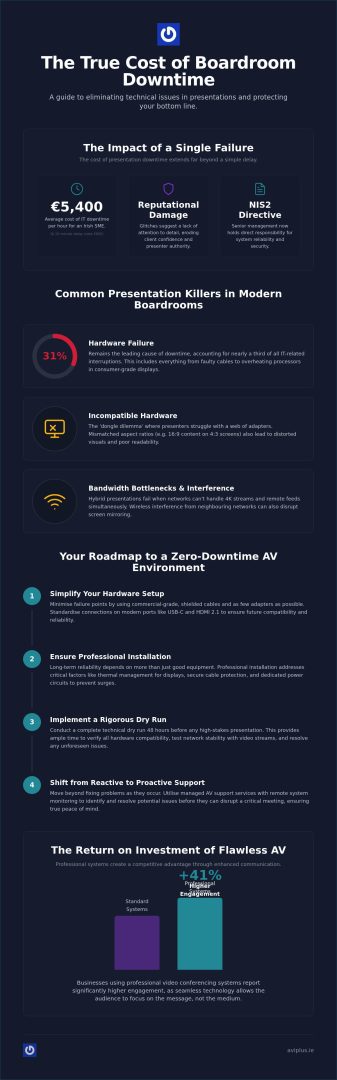
The financial impact of a technical failure in a Dublin boardroom is often underestimated. When you calculate the hourly cost of twenty senior executives sitting idle whilst a system reboots, the numbers become stark. According to Landmark Technologies, the average cost of IT downtime for an Irish SME is now upwards of €5,400 per hour. A mere ten-minute delay translates to €900 in lost productivity alone, excluding the missed opportunities and stalled decision-making that follow.
Reputational damage carries an even heavier price. For clients, a technical glitch isn’t just an inconvenience; it suggests a lack of attention to detail that could extend to your core services. This creates a significant hurdle for speakers who are already managing the fundamentals of public speaking. When the hardware fails, “tech anxiety” sets in, causing the presenter to lose their rhythm and authority. By 2026, corporate standards in Ireland have shifted. With the NIS2 Directive now in effect, senior management holds direct responsibility for system reliability and security. Simply “making it work” is no longer a viable strategy for avoiding technical issues during presentations.
Measuring the ROI of Flawless AV Delivery
Investing in high-end infrastructure provides a clear competitive advantage. Independent industry reports indicate that businesses using professional video conferencing systems Ireland report 41% higher engagement in meetings. Seamless technology ensures that the audience remains focused on the message rather than the medium. Prioritising avoiding technical issues during presentations isn’t just about the hardware; it’s about protecting your bottom line. This reliability fosters a culture of global collaboration where teams can connect with international partners without the friction of lag or audio dropouts.
Common Presentation Killers in Modern Boardrooms
Even the most prepared teams can be derailed by environmental factors. In high-density office hubs like Swords, wireless interference from neighbouring networks can frequently disrupt screen mirroring. Other common issues include:
- Incompatible Aspect Ratios: Displaying modern 16:9 content on older 4:3 commercial screens leads to distorted visuals and poor readability.
- Bandwidth Bottlenecks: Hybrid presentations often fail when local networks can’t handle simultaneous 4K streams and remote participant feeds.
- Hardware Failure: This remains the leading cause of downtime, accounting for 31% of all IT-related interruptions in business settings according to 2025 industry data.
Addressing these risks requires moving beyond consumer-grade solutions. Professional-grade screens and managed infrastructure provide the thermal management and signal stability needed to prevent mid-presentation shutdowns.
Essential Hardware Checks for Flawless AV Delivery
The foundation of avoiding technical issues during presentations is a simplified, high-quality signal chain. Every adapter or converter added between a laptop and a screen introduces a potential point of failure. Following a robust pre-presentation technical checklist ensures that these physical links are secure before the first slide is shown. Commercial-grade HDMI cables are essential here; unlike domestic versions, they feature superior shielding and locking mechanisms designed to withstand the rigours of constant use in professional environments.
Power management is equally vital, particularly for high-impact installations. A commercial LED wall Dublin requires dedicated circuits to handle the specific electrical load of large-scale digital displays. Without this infrastructure, you risk flickering or even system resets caused by power surges from other office equipment. Standardising your hardware is a proactive step toward avoiding technical issues during presentations, ensuring every speaker experiences a seamless connection. If you’re concerned about your current power distribution, our team can provide a comprehensive AV system audit to ensure stability.
Cables, Adapters, and the ‘Dongle’ Dilemma
By 2026, standardising on USB-C and HDMI 2.1 is the only way to ensure future-proof compatibility. Cheap third-party adapters often fail to negotiate the necessary handshake between devices, leading to the dreaded “No Signal” message. Whilst wireless presentation tools offer convenience, hard-wired connections remain the gold standard for high-stakes scenarios where latency or interference cannot be tolerated. We recommend keeping a kit of verified, branded adapters in every boardroom to prevent last-minute scrambles.
Audio and Visual Synchronisation
Visual clarity means little if the audio is out of sync. Lip-sync issues are particularly noticeable on large-format displays, where even a few milliseconds of delay can distract an audience. Testing the audio loop is a critical step; this involves ensuring that video conferencing microphones and speakers are perfectly synchronised to prevent acoustic feedback. For businesses using retail window display screens for presentations, calibrating brightness is also necessary. A screen that looks perfect at 9:00 AM may be unreadable in the afternoon glare if not professionally adjusted for local light conditions.
Professional Installation vs. DIY: Ensuring Long-Term Reliability
Many organisations attempt to reduce initial costs by installing boardroom technology themselves, yet this approach often leads to systemic failures. Professional installation is fundamental to avoiding technical issues during presentations because it addresses the physical stressors that DIY setups typically ignore. For instance, cable strain is a silent killer of AV reliability. When cables hang unsupported from a wall-mounted display, they place constant pressure on HDMI and USB-C ports. Over time, this leads to intermittent signal loss or permanent hardware damage that usually manifests at the most inconvenient moment.
Thermal management is another critical factor that separates professional setups from domestic ones. Consumer televisions aren’t engineered for the 8-hour or 16-hour duty cycles common in corporate environments. Without the specialised ventilation and heat dissipation found in commercial-grade screens, these units can overheat, triggering a sudden mid-presentation shutdown. Consulting with expert commercial screen suppliers Ireland ensures that the hardware selected is fit for purpose and capable of ensuring long-term reliability through a proper environmental assessment of your office space.
The Benefits of Integrated AV Systems
An integrated system removes the guesswork for the end user by simplifying the interface. Centralised control panels make “One-Touch Join” functionality a reality, ensuring that speakers don’t have to navigate complex menus or manually toggle inputs. Clean, recessed cabling further reduces the risk of accidental disconnections when people move around the room. Integrated AV serves as the invisible backbone of all modern corporate communication.
Commercial-Grade vs. Consumer Hardware
Durability is where commercial hardware truly earns its keep. In bright, modern Dublin offices with large windows, high-brightness LED walls significantly outperform traditional projectors, which often struggle with ambient light. The warranty and support structures also differ vastly between the two categories. Consumer hardware usually carries “return to base” warranties, which could leave your boardroom empty for weeks during a repair. Professional installations come with on-site service agreements that prioritise avoiding technical issues during presentations through rapid response times. For larger town-hall meetings or off-site conferences, businesses often utilise screen rental for events Dublin to scale their visual impact without a permanent capital investment.
The 2026 Pre-Presentation Technical Checklist
Success in a high-stakes boardroom meeting is often determined forty-eight hours before the first attendee arrives. A full dry run is the most effective method for avoiding technical issues during presentations, but it must be performed using the exact hardware and software intended for the event. Testing on a different laptop just to check the slides is a common mistake that overlooks driver incompatibilities or resolution mismatches that only appear on the day. Every component, from the remote clicker to the audio interface, needs a live stress test.
Two hours before the start time, implement a total firmware and software update blackout. An unexpected OS update or a forced graphics driver install can render a system useless for thirty minutes or more. During this window, perform a final network stability check. Guest presenters should be briefed on local AV controls, ensuring they know how to toggle between inputs or adjust volume without needing immediate technical assistance. This brief training session builds presenter confidence and prevents frantic calls to the IT department mid-meeting.
Always prepare a Plan B protocol. This includes keeping an offline version of your slides on a local drive to bypass potential internet outages and having physical handouts ready for the most critical data points. If you want to ensure your boardroom is always ready for action, you can enquire about a professional AV maintenance audit to identify potential weak points in your current workflow.
Network and Software Stability
External presenters often face VPN or firewall restrictions that prevent their devices from connecting to local commercial screens. Verifying these permissions in advance prevents awkward delays whilst IT permissions are sought. Additionally, ensure all notifications, system sounds, and sleep timers are disabled on the presentation machine. Testing cloud-based transitions on local Irish broadband speeds is vital; whilst fibre-to-the-building is increasingly common in Dublin, high-resolution media can still stutter if the network is congested by other office activities.
Physical Environment Optimisation
Lighting plays a pivotal role in visual impact. Adjusting the room’s lighting to prevent glare on digital menu boards Ireland or boardroom screens ensures that text remains legible from every seat. Check the line-of-sight for remote clickers and infrared sensors, as even a decorative plant or a misplaced water bottle can block a signal. Finally, verify that there is an adequate power supply at the podium for guest devices, as modern laptops running intensive presentation software can drain batteries surprisingly quickly.
Minimising Risk with Managed AV Support and Maintenance
Whilst the 2026 pre-presentation checklist is a vital safeguard, the most reliable method for avoiding technical issues during presentations is shifting from a reactive to a proactive support model. Waiting for a component to fail before seeking a fix is a high-risk strategy that often leads to expensive emergency call-outs and damaged reputations. Managed IT and AV support services in Ireland are typically priced between €50 and €150 per user, per month, providing a predictable expenditure that guards against the catastrophic costs of system failure. For businesses based in Swords or the Greater Dublin area, local support ensures that if a physical intervention is required, response times are kept to an absolute minimum within the Leinster region.
Proactive maintenance is consistently more cost-effective than emergency repairs. A managed contract covers the service, labour, and software troubleshooting required to resolve issues before they escalate. This is particularly relevant given that hardware failure remains the cause of 31% of all business downtime. By customising a maintenance contract to suit your specific corporate meeting frequency, you ensure that your high-traffic boardrooms receive the attention they need without paying for redundant site visits. This structured approach allows you to focus on your core business objectives whilst we manage the technical landscape.
The AVI Plus Approach to Zero-Failure AV
Our methodology focuses on identifying potential failure points before they impact a live meeting. Through remote monitoring, AVI Plus can detect hardware anomalies or software glitches in your video conferencing hubs before a presenter even enters the room. We provide regular health checks for LED walls, ensuring that pixel performance and thermal output remain within optimal parameters. Beyond the hardware, we offer bespoke training for your in-house team. This empowers them with the skills needed for professional display management and basic troubleshooting, further reducing the likelihood of user error, which accounts for 24% of IT-related incidents.
Future-Proofing Your Corporate AV Infrastructure
As we look toward the next generation of corporate communication, infrastructure must be capable of supporting 8K transitions and AI-enhanced video conferencing. These emerging technologies demand higher bandwidth and more sophisticated processing power than the standards of just a few years ago. Investing in high-efficiency LED display solutions also addresses growing corporate sustainability goals, reducing energy consumption without compromising on visual impact. By integrating these forward-thinking standards now, you’re not just avoiding technical issues during presentations today, but ensuring your facility remains a premium environment for the future. Secure your boardroom’s reliability with an AVI Plus maintenance contract today.
Securing Your Corporate Communication for the Future
Building a reliable presentation environment in 2026 requires more than just checking your cables on the morning of a meeting. It demands a strategic shift toward commercial-grade infrastructure and rigorous pre-event protocols. By prioritising professional installation and standardising your signal chains, you eliminate the common failure points that lead to costly boardroom delays. True peace of mind comes from knowing your systems are monitored and maintained by experts who understand the nuances of the Irish corporate landscape.
The secret to avoiding technical issues during presentations isn’t found in a last-minute scramble, but in the strength of your long-term technical partnership. Our Swords-based specialist Irish AV engineers provide local Leinster support and comprehensive maintenance contracts designed to keep your facility running at peak performance. Don’t let a hardware glitch undermine your next critical pitch.
Contact AVI Plus for Professional AV Installation and Support in Ireland and ensure your technology always matches the standard of your message. We’re here to help you lead every meeting with absolute confidence.
Frequently Asked Questions
What are the most common technical issues during a presentation?
The most frequent technical failures include hardware malfunction, software update interruptions, and incompatible signal handshakes. Hardware failure alone accounts for 31% of IT-related downtime in Irish businesses. These issues often stem from using consumer-grade cables or failing to perform a dry run with the exact laptop and display intended for the meeting. Ensuring your infrastructure is professionally installed reduces the risk of intermittent port damage.
How do I prevent my laptop from disconnecting from the screen?
To prevent disconnections, always use high-quality, shielded HDMI 2.1 or USB-C cables that feature locking mechanisms. Cheap third-party adapters are a common point of failure because they often struggle to negotiate the digital handshake between devices. Professional mounting also helps by providing cable support, which prevents gravitational strain from loosening the ports on your commercial screens or laptops over time.
Should I use wireless or wired connections for a business presentation?
Wired connections remain the superior choice for high-stakes business meetings where reliability is paramount. Whilst wireless tools offer convenience, they are susceptible to signal interference from other office networks, particularly in dense commercial hubs like Swords. A hard-wired connection eliminates latency and ensures a stable 4K stream, which is critical for avoiding technical issues during presentations that involve heavy media or live video.
Can I use a consumer TV for my office boardroom presentations?
Using a consumer TV for corporate presentations is generally discouraged because these units lack the cooling systems required for long duty cycles. Domestic screens are designed for a few hours of use, whereas commercial displays are engineered for 16-hour or even 24-hour operation. Professional screens also offer higher brightness levels, which are necessary to combat the ambient light found in modern, glass-fronted Dublin offices.
What should I do if the audio fails during a video conference?
If audio fails, immediately check that your video conferencing software has the correct hardware hub selected as the primary input and output device. Perform a quick loopback test to verify that the microphone is picking up sound. If the issue persists, it may be an acoustic feedback loop or a synchronisation error between the digital signal processor and the speakers, which typically requires a professional system reset.
How often should corporate AV equipment be maintained?
Corporate AV equipment should ideally undergo a comprehensive health check every three to six months. Frequent maintenance is the most effective strategy for avoiding technical issues during presentations, as it allows engineers to identify failing components or outdated firmware before they cause a meeting to stall. This proactive approach is significantly cheaper than the €5,400 per hour average cost of IT downtime for Irish SMEs.
Is it worth hiring professional AV support for a one-off event in Dublin?
Hiring professional support for a major event is a wise investment in your brand’s reputation. For high-profile conferences in Dublin, a professional AV package including a technician typically costs between €800 and €1,500 per day. This ensures that complex signal chains and hybrid streaming components are managed by experts, allowing your team to focus entirely on delivery rather than troubleshooting hardware glitches.
How can I avoid glare on my presentation screen in a bright office?
To eliminate glare, you should prioritise high-brightness LED walls over traditional projectors, as LED technology offers superior contrast in well-lit environments. Positioning the display away from direct window light or installing motorised blinds can also help. Commercial-grade screens are often manufactured with anti-reflective coatings specifically designed to maintain clarity and colour accuracy even in the brightest Irish office spaces.