
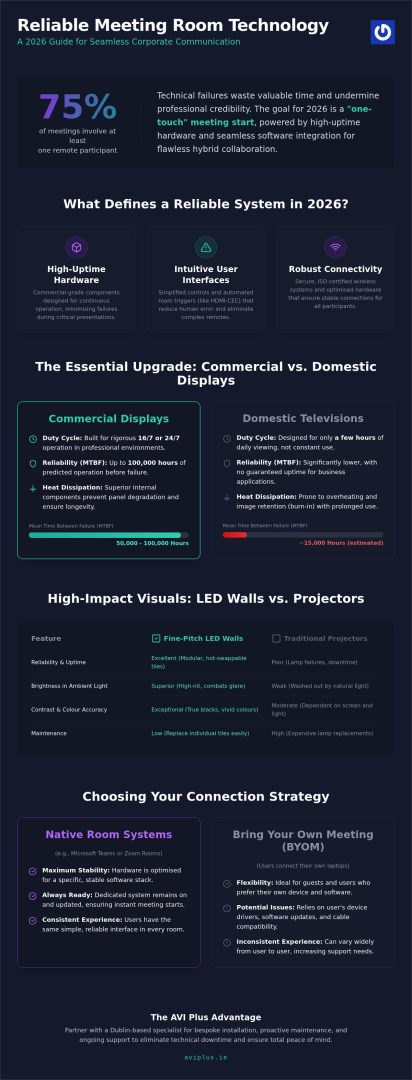
Imagine entering your boardroom for a high-stakes pitch, only to find a frayed HDMI cable or a screen that refuses to sync with your device. It’s a frustratingly common scene that wastes valuable time and undermines professional credibility. With over 75% of meetings now involving at least one remote participant, the pressure to maintain a stable connection has never been higher. Finding reliable meeting room presentation tools is no longer just a convenience; it’s a fundamental requirement for any Irish business aiming for seamless corporate communication.
We understand that technology should serve your objectives, not dictate your schedule. This 2026 guide promises to simplify the complex landscape of hardware and software, showing you how to achieve a “one-touch” meeting start every time. We’ll examine the shift from domestic-grade screens to high-performance commercial displays and explore how proactive maintenance ensures your systems never fail when it matters most. From our new showroom in Swords to boardrooms across Dublin, we’ve seen how the right integration creates crystal-clear hybrid collaboration and total peace of mind for every attendee.
Key Takeaways
- Learn why the transition from consumer-grade screens to high-uptime commercial hardware is the essential baseline for Irish businesses in 2026.
- Discover how to select reliable meeting room presentation tools that combine intuitive user interfaces with secure, ISO-certified wireless connectivity.
- Understand the technical advantages of fine-pitch LED walls and commercial screens in creating high-impact, professional boardroom environments.
- Master the two-step room optimisation process, focusing on professional acoustic audits and glare-free lighting to support hybrid collaboration.
- Explore the benefits of partnering with a Dublin-based specialist for bespoke installation and ongoing maintenance to eliminate technical downtime.
What Defines Reliable Meeting Room Presentation Tools in 2026?
In 2026, reliable meeting room presentation tools are defined by the seamless intersection of high-uptime hardware, intuitive user interfaces, and robust connectivity. It’s no longer enough for a screen to simply display an image; it must integrate perfectly with core communication technologies to support hybrid collaboration. For Irish businesses, the baseline has shifted from “consumer-plus” devices to true commercial-grade infrastructure that guarantees performance under pressure.
Think about the financial impact of a technical failure. If six senior managers sit idle for 15 minutes whilst an HDMI cable is hunted or a software update is forced, the lost productivity cost often exceeds the price difference of a professional system. Modern reliability leverages HDMI-CEC and automated room triggers, ensuring that when the first person enters the room, the system wakes up instantly. This automation reduces human error and removes the need for complex remote controls that often require an IT degree to operate.
The 24/7 Duty Cycle: Why Commercial Screens Matter
Domestic televisions are designed for a few hours of evening viewing, whereas commercial screens are built for rigorous 16/7 or 24/7 duty cycles. These professional displays feature superior heat dissipation and specialised internal components that prevent panel degradation over years of heavy use in a boardroom environment. Mean Time Between Failure (MTBF) for commercial screens is a technical metric representing the predicted elapsed time between inherent failures of a system during operation, typically reaching 50,000 to 100,000 hours in high-end models.
Software Agnostic vs. Native Room Systems
Choosing between “Bring Your Own Meeting” (BYOM) and native room systems is a critical decision for stability. Whilst BYOM offers flexibility for guests, dedicated Microsoft Teams or Zoom Room kits provide a more stable presentation experience because the hardware is optimised for a specific software stack. These native systems remain “always ready” and benefit from regular firmware updates managed by a professional partner. This approach ensures your reliable meeting room presentation tools stay secure and functional without manual intervention from your staff, providing a consistent user experience across every room in your office.
High-Performance Display Solutions: LED Walls and Commercial Screens
Investing in reliable meeting room presentation tools starts with the visual core of your space. In 2026, 4K resolution has moved from a luxury to an absolute minimum requirement for corporate environments. High-resolution screens ensure that intricate spreadsheets, technical drawings, and detailed architectural designs remain perfectly legible for every attendee. For many organisations, the transition to a commercial LED wall in Dublin represents the pinnacle of visual engagement. These systems provide the high-nit brightness necessary to combat the glare found in contemporary glass-fronted Irish offices, where natural light often washes out standard consumer displays.
When selecting your hardware, it’s vital to consider how the display integrates with other peripherals. Modern screens often work alongside expandable meeting room solutions to create a unified ecosystem. This integration ensures that visuals and audio remain perfectly synchronised, preventing the disjointed experiences that often plague poorly planned spaces. By prioritising hardware designed for commercial use, you eliminate the common failure points associated with domestic-grade equipment.
LED Walls vs. Projectors: The Reliability Verdict
Projectors were once the standard, but their reliance on expensive lamps and sensitivity to ambient light makes them less dependable for modern needs. Fine-pitch LED walls offer a superior alternative. Their modular design is a significant advantage for long-term reliability; “hot-swappable” tiles allow for individual components to be replaced without taking the entire screen offline. This prevents a total system blackout during critical presentations. Beyond uptime, LED technology delivers exceptional contrast ratios and colour accuracy, ensuring your brand colours are represented exactly as intended.
Choosing the Right Screen Size for Your Room
Size selection should follow the “4-6-8” rule to maintain legibility. This industry standard dictates that for analytical viewing, the screen height should be at least one-quarter of the distance to the furthest viewer. In larger Irish boardrooms, dual-screen setups are becoming the preferred configuration. This layout separates presentation content from remote participants, allowing for more natural eye contact and engagement. Consulting with professional commercial screen suppliers in Ireland ensures you choose hardware that fits both your physical space and your technical requirements.
If you’re looking to upgrade your boardroom visuals, you can explore our range of commercial displays to find a bespoke solution that fits your specific business needs.
Seamless Connectivity: Wireless Presentation Systems
The days of fumbling with tangled HDMI leads or searching for missing adaptors are over. True reliable meeting room presentation tools now rely on sophisticated wireless ecosystems that prioritise both speed and security. In 2026, corporate environments in Ireland demand high-bandwidth performance capable of streaming 4K video content without the stuttering or latency issues that plagued earlier iterations. This level of reliability is essential for maintaining the flow of a professional pitch or a high-stakes board meeting where technical interruptions are simply not an option.
Security remains a paramount concern for IT departments. Modern wireless systems now feature ISO-certified encryption to ensure that sensitive corporate data remains protected whilst transitioning across the office network. This is a significant step up from consumer-grade screen mirroring, which often lacks the robust protocols required for Irish financial or legal sectors. For a truly integrated approach, these tools often form the backbone of broader video conferencing systems in Ireland, allowing for a single interface to manage both local presentations and remote participants simultaneously.
Hardware Buttons vs. Software Apps
Choosing between physical USB buttons and software-based apps depends largely on who is using the room. Physical buttons remain the gold standard for guest presenters; they offer a genuine plug-and-play experience that bypasses the need to join a secure corporate Wi-Fi network. Conversely, internal staff often prefer app-based sharing for its convenience and the lack of physical hardware to misplace. A balanced system allows for both, providing a guest-friendly button whilst maintaining a streamlined app interface for daily users who are already authenticated on the network.
Centralised Management of Presentation Tools
Reliability is bolstered by the ability to monitor equipment health remotely. IT managers in Dublin can now oversee the status of every reliable meeting room presentation tool across multiple floors or even different office branches from a single dashboard. This centralised approach allows for proactive maintenance and remote troubleshooting, where up to 90% of common connectivity issues can be resolved without a technician ever stepping foot in the room. The adoption of Power over Ethernet (PoE) has further simplified these installations, reducing the number of power points required and ensuring a cleaner, more stable setup that is easier to manage at scale.
Organising Your Space: Room Design for Maximum Reliability
Reliability extends beyond the software and hardware selected; it encompasses the physical environment where these systems operate. A poorly designed room can undermine even the most reliable meeting room presentation tools by introducing environmental failures. To achieve a high-performance environment, follow these essential steps:
- Step 1: Acoustic Audit. Conduct a thorough assessment to ensure audio remains clear. Echoes and background noise can distract remote participants and diminish the impact of your presentation.
- Step 2: Lighting Optimisation. Balance natural light to avoid screen glare whilst ensuring cameras can clearly see in-room participants. This is particularly vital in modern Irish offices with extensive glass facades.
- Step 3: Cable Management. Implement robust routing solutions to prevent physical wear and tear. Hidden cables aren’t just for aesthetics; they protect connections from being accidentally kicked or pulled.
- Step 4: Ergonomic Positioning. Mount displays at the correct eye level for seated participants. This prevents “meeting fatigue” and ensures long presentations remain comfortable for everyone in the room.
- Step 5: One-Touch Control. Integrate a centralised panel to manage lighting, audio, and displays simultaneously. This removes the need for multiple remotes and simplifies the user experience.
Huddle Rooms vs. Boardrooms: Tailoring the Tools
Small huddle spaces benefit most from “All-in-One” bars that combine cameras, microphones, and speakers into a single unit. These systems offer maximum reliability through simplicity, reducing the number of potential failure points. In contrast, large boardrooms require distributed audio systems and multiple presentation points to ensure every participant has a clear view and voice. For agile Dublin offices that frequently reconfigure their layout, mobile presentation stands provide a flexible way to bring professional AV capabilities to any corner of the building without permanent structural changes.
The Importance of Professional Calibration
Your brand identity relies on visual consistency across all touchpoints. Professional colour calibration ensures that your corporate palette looks identical on every screen in the building, from the lobby to the executive boardroom. Brightness must also be adjusted to account for the shifting Irish weather, where a gloomy morning can quickly turn into a bright afternoon. Automated brightness sensors reduce energy costs and eye strain by dynamically adjusting the display output based on the ambient light levels in the room. If you need assistance designing a space that supports your technical goals, you can contact our team for a professional room audit.
The AVI Plus Advantage: Professional Installation and Support in Ireland
Choosing “off-the-shelf” retail products often leads to disappointment in a high-pressure corporate setting. Whilst a consumer screen might look adequate in a shop window, it lacks the integrated communication protocols and durable hardware required for reliable meeting room presentation tools. At AVI Plus, we bridge this gap by providing bespoke systems tailored specifically for the Irish commercial sector. Our process begins with a detailed consultation at our base in Swords, Co. Dublin, followed by professional installation across the Greater Dublin area and beyond. This ensures that every component, from the mounting brackets to the wireless encryption, is configured to professional standards.
Our focus is exclusively commercial. We don’t deal with domestic home cinemas, which allows us to dedicate 100% of our expertise to boardroom reliability and corporate communication. This specialisation means we understand the unique challenges of Irish office environments, such as integrating legacy hardware with modern cloud-based software. By selecting a local partner, you gain access to a level of accountability and technical depth that global online retailers simply cannot provide.
Proactive Maintenance vs. Reactive Repair
The dreaded “Friday afternoon failure” usually happens when a system hasn’t been checked for months. A professional AV maintenance contract transforms your technical strategy from reactive fire-fighting to proactive health management. These contracts include regular firmware updates, cable integrity checks, and panel calibration to prevent downtime before it occurs. Because our technicians are based in Swords, we offer rapid on-site response times that keep your business moving. Regular health checks don’t just prevent crashes; they significantly extend the operational life of your commercial screens, ensuring a better return on your initial investment.
Future-Proofing Your Presentation Technology
Technology evolves rapidly, but your infrastructure shouldn’t need a total overhaul every two years. We design scalable systems that allow you to add more rooms or upgrade specific components without reinventing your entire tech stack. Planning for the next five years of AV evolution involves choosing hardware that supports emerging standards in 4K wireless and AI-driven meeting summaries. This forward-thinking approach ensures your investment remains relevant as your team grows. If you’re ready to upgrade your workspace, you can organise a professional AV consultation with AVI Plus today to secure your boardroom’s future.
Securing Your Corporate Communication Future
Achieving a seamless boardroom experience requires moving beyond basic hardware to a fully integrated ecosystem. By prioritising commercial-grade displays and ISO-certified wireless systems, your organisation can eliminate the technical friction that often stalls productive discussions. Success in 2026 is built on the intersection of high-performance hardware and meticulous room design, ensuring that every participant, whether in-room or remote, experiences crystal-clear visuals and audio.
As an Irish-owned specialist based in Swords, AVI Plus understands the specific needs of the local commercial sector. Our dedicated team manages every detail, from the initial consultation to comprehensive maintenance and support contracts that prevent downtime. We focus exclusively on commercial AV, providing the expertise needed to implement reliable meeting room presentation tools that grow with your business. Investing in professional installation ensures your technology remains a silent, supportive partner in every pitch and presentation.
Ready to transform your workspace? You can enquire about reliable presentation tools for your Dublin office today. Let’s build a boardroom that inspires confidence and drives results.
Frequently Asked Questions
What are the most reliable wireless presentation tools for guest speakers?
Hardware-based USB buttons are the most dependable choice for guest presenters. These physical buttons allow a visitor to plug into their laptop and share content instantly without joining your secure corporate Wi-Fi. This bypasses the need for software installation or complex network permissions. By using these physical reliable meeting room presentation tools, you ensure that external guests can start their pitch immediately without technical delays.
Why should I choose a commercial screen over a high-end consumer TV for my boardroom?
Commercial screens are engineered for rigorous 16/7 or 24/7 duty cycles, whereas consumer TVs are designed for only a few hours of daily use. Professional displays feature high-nit brightness to combat glare and advanced cooling systems that prevent panel burnout. They also include specialised control ports for automated integration. This makes them far more dependable for business environments where a screen failure can disrupt critical operations.
How much does it cost to install a professional meeting room presentation system in Dublin?
The cost of a professional installation in Dublin depends on the scale of the room and the specific hardware selected. Factors influencing the final investment include the choice between LED walls or commercial screens, the complexity of the cable management, and the integration of wireless systems. We recommend a bespoke consultation to assess your space and provide an accurate estimate that accounts for both high-quality hardware and expert labour.
Can I integrate my existing Microsoft Teams setup with new presentation hardware?
You can absolutely integrate your existing Microsoft Teams or Zoom setup with modern hardware. Professional AV systems are designed for high compatibility, allowing you to upgrade your screens or audio whilst maintaining your preferred software interface. Using native room kits often provides the most stable experience, ensuring that your reliable meeting room presentation tools work in perfect harmony with your established corporate communication workflows.
What is the best way to prevent HDMI cables from failing in meeting rooms?
The best way to prevent cable failure is to reduce physical handling through professional cable management or wireless alternatives. Implementing high-quality cable retractors or under-table routing protects the delicate internal wiring of HDMI leads from being pulled or twisted. Many Dublin businesses are now moving toward wireless presentation systems entirely. This eliminates the “cable scramble” and removes the primary physical failure point in the boardroom setup.
Do LED walls require more maintenance than traditional projectors?
LED walls generally require less frequent maintenance than traditional projectors because they don’t rely on lamps or filters that degrade. Their modular design allows for “hot-swappable” repairs, where individual tiles can be replaced without taking the entire screen offline. Whilst a projector might require a lamp change every few thousand hours, a commercial LED wall is designed to last for up to 100,000 hours with minimal technical intervention.
How does AVI Plus handle technical support for businesses in Swords and Dublin?
We provide dedicated support from our base in Swords through proactive maintenance contracts. Our local technicians perform regular system health checks to identify and resolve potential issues before they cause downtime. This local presence ensures rapid on-site response times across the Greater Dublin area. We focus exclusively on the commercial sector, meaning our support team understands the high-stakes nature of boardroom technology and prioritises constant uptime.
What are the security risks of wireless presentation systems?
Security risks include unauthorised network access and the interception of unencrypted data during a presentation. Consumer-grade wireless tools often lack the robust security protocols required for corporate environments. To mitigate these risks, professional systems use ISO-certified encryption and allow IT managers to segregate guest traffic from the primary corporate network. This ensures that sensitive information remains protected whilst still allowing for seamless and easy-to-use wireless sharing.


